This page describes the enhancements and the general dependencies covered within this version of opuspay
Tokenized Payments:
Tokenization is a process of replacing sensitive data with a unique identifier called a token. Payment tokenization replaces primary account number (PAN) and other “real” data with a substitute value that performs all the essential functions. That replacement value (the token) is worthless in any other context, essentially removing payment data from visibility.
Payment tokenization replaces sensitive data—like the customer’s primary account number, or PAN—with a unique token generated by complex algorithms that cannot be duplicated or decoded. The token can then be used in subsequent transactions for functions like adding a tip or for recurring billing.
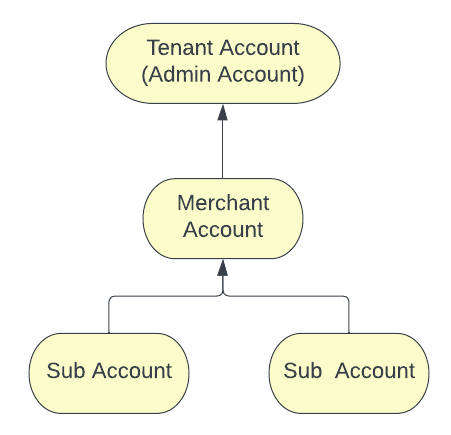
According to the above account hierarchy when data showing through a particular account, the data would load logged account related details and its sub accounts details only.
Security Profile Configuration
Admin Portal: (Settings -> Security -> Security Profiles)
The below functions would available for the user to configure the security profile.
Payment Details Collection
1. Payment Method Request Email -> The generated link for the payment details collection will expire in 24 hours. If the user tries to register a payment method after 24 hour expiry period then opuspay will display the following message.
"The repayment plan registration link has expired. Please re-initiate repayment plan registration through byondpro"
Note: When the user re-initiates the repayment plan registration through byondpro, opuspay should check whether the previously sent link has expired or not. If it is not expired, then the link should be expired when sending a new link.
Recurring Payment Scheduling and Processing
1. Payment Notice Email -> The generated link for the payment notice will expire in 24 hours. If the user tries to use the link to pay the installment after 24 hours then opuspay should display the following message.
"The payment link has expired. Please re-initiate the requesting a payment link through byondpro" (
Refer Screen)
Note: When the user re-initiates the requesting a payment link through byondpro, opuspay should check whether the previously sent link has expired or not. If it is not expired, then the link should be expired when a new link is sent.
2. If the payment fails, then the user can retry 3 time through opuspay. Each time a new link would be generated through opuspay and when sending the link it would check whether the previously sent link is expired or not. If it is not expired, then the link should be expired when sending a new link.
3. Payment success message would generate through byondpro.
Expiring INIT Token
What is INIT Token?
IN opuspay, INIT token is used to initiation tokenised payment registration and retrieving a token from the gateway for a payment series.
There are two scenarios where INIT token should be expired.
1. Complete of payment plan (Zero Outstanding), Call will be sent to opuspay inactivate the recurring token created against the payment plan and INIT token will be null in the database (If the INIT token is registration incomplete, token will be called to expired).
2. If a payment method is changed via change attribute "payment detail collection workflow" will applied and current registered recurring token will be expired in opuspay and INIT token will be null in the database (If the INIT token is registration incomplete, token will be called to expired). Payment Method Registered tick-box will be unticked until new registration completed.
Amendments:
1. Tokenised Transaction Summary screen needs to update the date formate as 'dd-mm-yyyy'
Word 'Tokenised' vs 'Tokenized' (ticket)
-
Both "tokenise" and "tokenize" are correct spellings, but their usage depends on the variety of English being used.
-
In British English, the preferred spelling is "tokenise" (with an "s").
-
In American English, the preferred spelling is "tokenize" (with a "z").
Based on 23002 ticket, following is updated in the spec.
Admin Portal
-
-
Tokenised Transaction Summary
-
Tokenised Transaction Summary -> Search Transaction
-
Tokenised Transaction Summary -> Inactive Token - warning Message
Merchant Portal
-
-
Tokenised Transaction Summary
-
Tokenised Transaction Summary -> Search Transaction
-
Tokenised Transaction Summary -> Inactive Token - warning Message