To properly display this page you need a browser with JavaScript support.
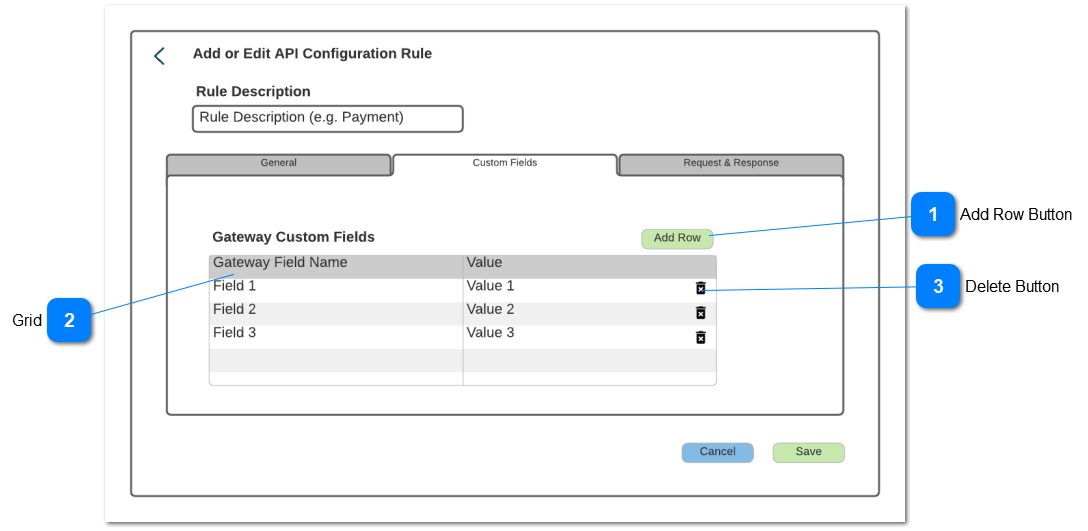
Allows the user to provide custom fields that may be required by the Gateway API
Add Row Button
Adds a new row into the grid
Type
Notes
Rules
Compulsory
Format
Edit
Size
Default
Error Message
Button
When selected add a new row into the grid in edit mode
Grid
Used to create the custom fields
Type
Notes
Rules
Compulsory
Format
Edit
Size
Default
Error Message
Grid
Text
Custom Field
User to enter the field descriptor
When adding a new row, add/edit that row in the grid
Hyperlink on the Custom Field to open and edit it
Y
Y
Please enter a custom field descriptor
Text
Value
User to enter the field value
Edit the field in the grid
Y
Y
Please enter a value for the custom field
Delete Button
Function to delete a custom field
Type
Notes
Rules
Compulsory
Format
Edit
Size
Default
Error Message
Button
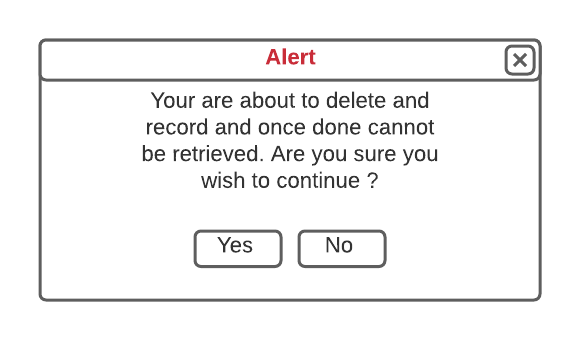
When selected pop-up the Delete message
Delete Alert Pop-Up
Type
Notes
Rules
Compulsory
Format
Edit
Size
Default
Error Message
Pop-Up
If Yes is selected then delete the row, close pop-up and return to the active tab (the tab that the user was in at the time of pressing the cancel button) in view mode
If No, close pop-up and continue to edit the Active tab