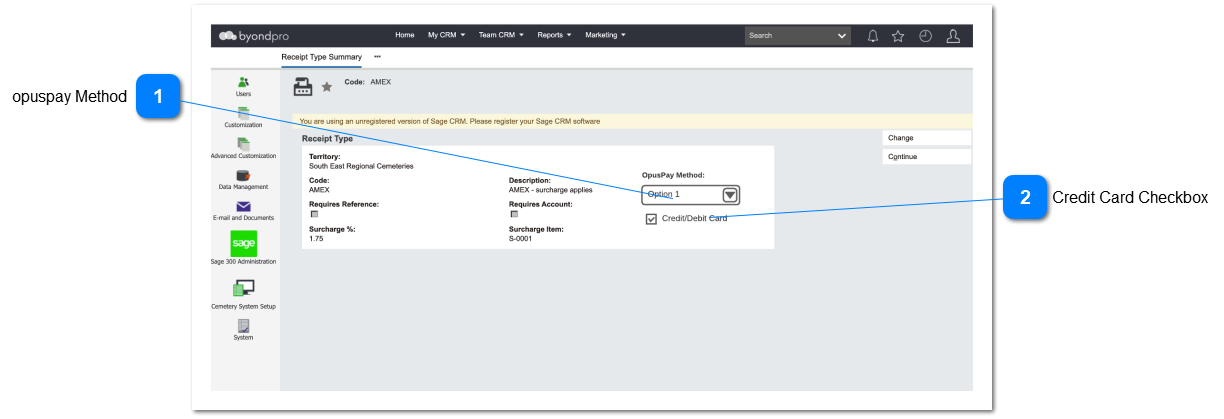
Cemetery System Setup - Receipt Types
 opuspay Method Assigns an opuspay Payment Method to the byondpro Receipt Type
|
Type
|
Notes
|
Rules
|
Compulsory
|
Format
|
Edit
|
Size
|
Default
|
Error Message
|
|
ComboBox
|
|
-
If the byondpro instance is not registered with opuspay then grey out this combobox and do not perform validations on this field.
-
Call the opuspay API and Display a list of the payment methods setup by the merchant in opuspay. Display two columns in the combobox list being:
-
-
-
Allow for a single selection from the dropdown list
-
An opuspay Payment Method may only be assigned to a single byondpro Receipt Type
-
Allow for the selection of a "None" option. This will mean that no opuspay Method is assigned to the Receipt Type
|
N
|
|
Y
|
|
Empty
|
4. This payment method is already in use by another Receipt Type for the same Territory.
| |
|
 Credit Card Checkbox
Defines if the opuspay Method is a credit or debit card type
|
Type
|
Notes
|
Rules
|
Compulsory
|
Format
|
Edit
|
Size
|
Default
|
Error Message
|
|
CheckBox
|
|
-
If the opuspay Method selected is a credit/debit card type then automatically check this field
|
Y
|
|
N
|
|
|
| |
|