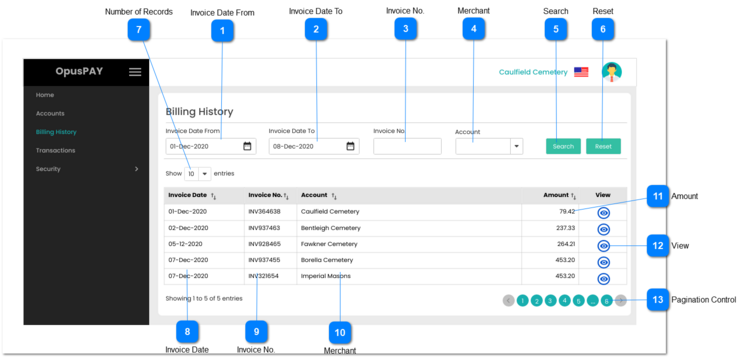
This screen allows the user to search and view previously raised merchant invoices.
 Invoice Date From
|
Type
|
Notes
|
Rules
|
Compulsory
|
Format
|
Edit
|
Size
|
Default
|
Error Message
|
|
Date
|
-
|
1. This should allow the user to select a date.
2. Date field is blank and displays a calendar tool when the user clicks on this field (similar to Generate Transaction Invoices in byondcloud).
3. This Date will be used to search for Merchant Invoices that were invoiced starting from the date selected.
|
N
|
-
|
Y
|
-
|
Blank
|
-
| |
|
 Invoice Date To
|
Type
|
Notes
|
Rules
|
Compulsory
|
Format
|
Edit
|
Size
|
Default
|
Error Message
|
|
Date
|
-
|
1. This should allow the user to select a date.
2. Date field is blank and displays a calendar tool when the user clicks on this field (similar to Generate Transaction Invoices in byondcloud).
3. This Date will be used to search for Merchant Invoices that were invoiced up to the date selected in this field.
|
N
|
-
|
Y
|
-
|
Blank
|
-
| |
|
 Invoice No.
|
Type
|
Notes
|
Rules
|
Compulsory
|
Format
|
Edit
|
Size
|
Default
|
Error Message
|
|
Text
|
-
|
1. This should allow the user to enter an invoice number.
2. Allows for any characters or numbers.
|
N
|
-
|
Y
|
100
|
Blank
|
-
| |
|
 Merchant
|
Type
|
Notes
|
Rules
|
Compulsory
|
Format
|
Edit
|
Size
|
Default
|
Error Message
|
|
Combo-Box
|
-
|
1. This should allow the user to search for and select an existing Merchant from the database.
|
N
|
-
|
Y
|
-
|
Blank
|
-
| |
|
 Search
|
Type
|
Notes
|
Rules
|
Compulsory
|
Format
|
Edit
|
Size
|
Default
|
Error Message
|
|
Button
|
-
|
1. This should populate the grid of all merchant invoices matching the provided search criteria when clicked.
2. Display an error message if no Merchant Invoices are found.
|
-
|
-
|
Y
|
-
|
-
|
No invoices found that match the criteria entered. Please change the criteria and search again.
| |
|
 Reset
|
Type
|
Notes
|
Rules
|
Compulsory
|
Format
|
Edit
|
Size
|
Default
|
Error Message
|
|
Text
|
-
|
1. This should clear the search fields when clicked.
|
-
|
-
|
Y
|
-
|
-
|
-
| |
|
 Number of Records
|
Type
|
Notes
|
Rules
|
Compulsory
|
Format
|
Edit
|
Size
|
Default
|
Error Message
|
|
Combo-Box
|
-
|
1. This should allow the user to select an option to control the number of billing records visible in the grid.
2. Displays following options to select from:
|
-
|
-
|
Y
|
-
|
10
|
-
| |
|
 Invoice Date
|
Type
|
Notes
|
Rules
|
Compulsory
|
Format
|
Edit
|
Size
|
Default
|
Error Message
|
|
Column
|
-
|
1. This should display the invoice dates for the invoices matching the criteria entered when the Search button is clicked.
2. This should be sortable.
|
-
|
-
|
N
|
-
|
-
|
-
| |
|
 Invoice No.
|
Type
|
Notes
|
Rules
|
Compulsory
|
Format
|
Edit
|
Size
|
Default
|
Error Message
|
|
Column
|
-
|
1. This should display the invoice numbers for the invoices matching the criteria entered when the Search button is clicked.
2. This should be sortable.
|
-
|
-
|
N
|
-
|
-
|
-
| |
|
 Merchant
|
Type
|
Notes
|
Rules
|
Compulsory
|
Format
|
Edit
|
Size
|
Default
|
Error Message
|
|
Column
|
-
|
1. This should display the merchant names for invoices matching the criteria entered when the Search button is clicked.
2. This should be sortable.
|
-
|
-
|
N
|
-
|
-
|
-
| |
|
 Amount
|
Type
|
Notes
|
Rules
|
Compulsory
|
Format
|
Edit
|
Size
|
Default
|
Error Message
|
|
Column
|
-
|
1. This should display the Invoice Total for the invoices matching the criteria entered when the Search button is clicked.
2. This should be sortable.
|
-
|
-
|
N
|
-
|
-
|
-
| |
|
 View
|
Type
|
Notes
|
Rules
|
Compulsory
|
Format
|
Edit
|
Size
|
Default
|
Error Message
|
|
Button
|
-
|
1. This should allow the user to view the invoice PDF file linked to this invoice line.
2. Select the invoice PDF that was created and persisted to the server at the time of invoice generation for this merchant.
Refer to the specification for invoice screen here.
|
-
|
-
|
Y
|
-
|
-
|
-
| |
|
 Pagination Control
|
Type
|
Notes
|
Rules
|
Compulsory
|
Format
|
Edit
|
Size
|
Default
|
Error Message
|
|
Button
|
-
|
1. This should allow the user to paginate through the billing history records when clicked.
2. To determine the number of pagination buttons to display please follow the current logic that is being used in byondcloud.
|
-
|
-
|
Y
|
-
|
-
|
-
| |
|